Gitleaks: Find the Gap Before It Reaches main
Introduction
A pushed secret is already public enough to matter. This note uses Gitleaks, a Go secret scanner, as a short safety net: find hardcoded credentials in history, check staged changes locally, then block bad pushes in CI.
The setup below assumes the current release is v8.30.1. Gitleaks is now
feature-complete, so treat it as stable tooling, not as a platform to build on.
Installation
Homebrew
brew install gitleaksDocker
Run scans without installing anything:
docker pull ghcr.io/gitleaks/gitleaks:latestdocker run -v "$(pwd)":/path ghcr.io/gitleaks/gitleaks:latest git /pathThe volume mount matters: the container cannot scan history it cannot see.
Go
The repo moved, but the Go module path did not:
go install github.com/zricethezav/gitleaks/v8@v8.30.1Usage
Scan committed history
gitleaks gitgitleaks git -v path/to/repogitleaks git --redactgitleaks git reads committed history only. It does not see uncommitted edits.
Scan staged and unstaged changes
These flags are different:
gitleaks git --pre-commit --staged--pre-commit sees unstaged changes. --staged sees staged changes. Use both
before committing.
Scan a directory or stdin
gitleaks dir -v ./some/pathcat config.yaml | gitleaks stdinMake reports fail CI
gitleaks git --report-format sarif --report-path results.sarif --redactExit 1 means leaks were found, so the CI step fails without extra scripting.
Block bad pushes
Local pre-commit hook
Use the pre-commit framework and add this file:
repos:
  - repo: https://github.com/gitleaks/gitleaks
    rev: v8.30.1
    hooks:
      - id: gitleaks
Then install it:
pre-commit installMinimal CI gate
The critical line is fetch-depth: 0; shallow clones leave almost no history
to scan:
- uses: actions/checkout@v6
  with:
    fetch-depth: 0
- name: Scan for secrets
  run: |
    docker run -v "$PWD":/repo ghcr.io/gitleaks/gitleaks:latest \
      git /repo --report-format sarif --report-path /repo/results.sarif --redact
Proof
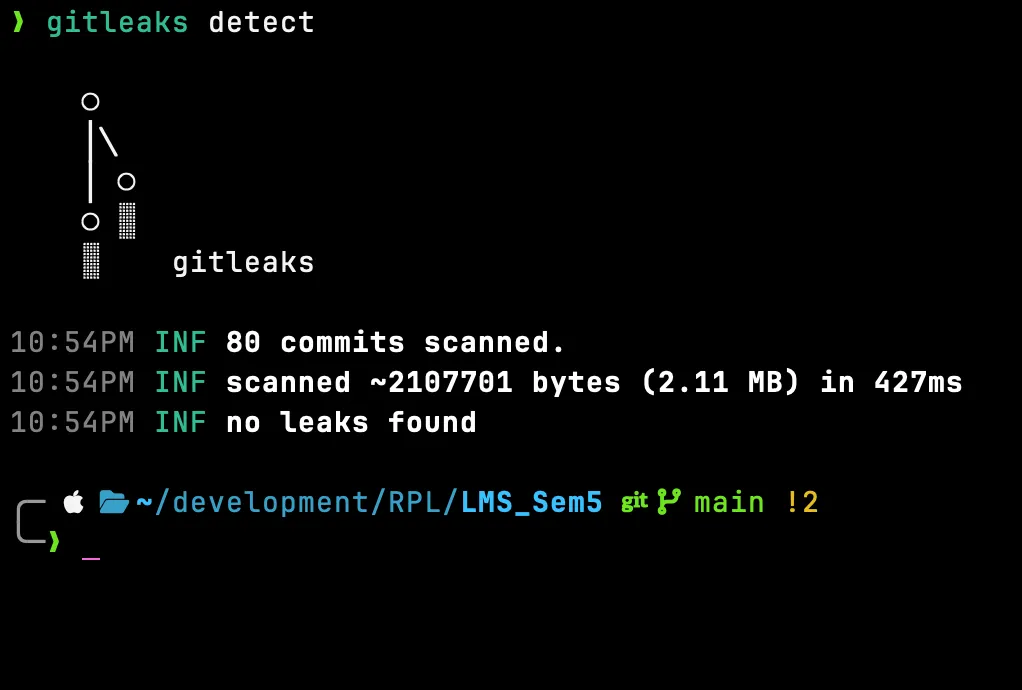
A real run on one of my own repos — 80 commits scanned in 427 ms, no leaks found: